


OneBusAway
4.23.25K Reviews
App Specs
- Version
- Varies with Device
- Updated On
- License
- Free
- Downloads
- 1,000,000+
- Developer
- OneBusAway
- Categories
- Maps & Navigation
- Platform
- Android
Screenshots
 Analysis by AppCompare
When I am standing at a bus stop wondering whether to wait or start walking, a transit app has one job: turn uncertainty into a useful next decision. OneBusAway approaches that problem with real-time transit information rather than trying to become an all-purpose travel platform. I found it most valuable when I already knew roughly which bus or stop I needed and wanted a better answer than simply reading a printed timetable.
Developed by OneBusAway, this free Maps & Navigation app is aimed at everyday public-transit riders. It has an average rating of 4.2 from around 10K ratings, with more than 1M+ installs, which suggests that it has reached well beyond a small group of enthusiasts. Its Everyone age rating also makes it suitable for a broad audience, although the practical value still depends heavily on whether the transit service around you is supported.
From a missed connection worry to a more confident trip
I’ll focus on the moment when a missed connection starts to feel possible, and on how checking the next practical option can replace guesswork with a calmer decision. I also find that having a simple fallback in mind before leaving makes live arrival information easier to act on.
Starting with the situation at the stop
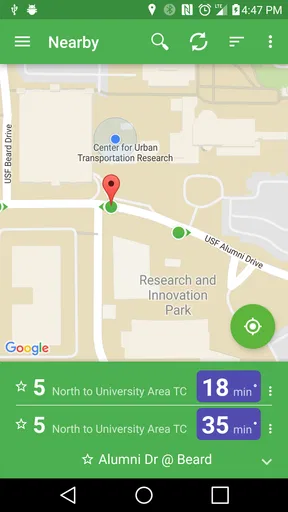
My typical starting point is simple: I am leaving work, heading to a station, or waiting at a familiar stop, but I do not know whether the next vehicle is genuinely close or merely scheduled to appear. I open OneBusAway and begin with the stop or route rather than building an elaborate trip plan. That distinction matters. The app feels designed around answering “what is happening with this transit service now?” rather than replacing every other navigation tool on my phone.
For a regular rider, that focused approach can be refreshing. I do not have to treat the app as a complete city guide. I can use it at the exact moment when a timetable stops being enough. If a bus is delayed, early, or approaching, real-time information can change whether I stay put, walk to another stop, or look for a different connection.
The first practical check is coverage. OneBusAway is an open-source project, but that does not mean every city, operator, or route automatically appears in the same way. Before relying on it for an important appointment, I would search for a familiar stop and compare what it shows with the local agency’s signs or official information. This is not a criticism unique to this app; live transit tools are only as useful as the feed behind them. Still, it is the most important first step for a new user.
Finding the right stop without creating another problem
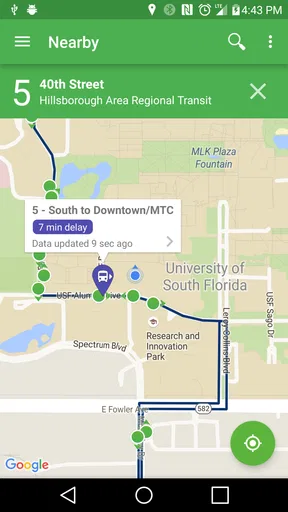
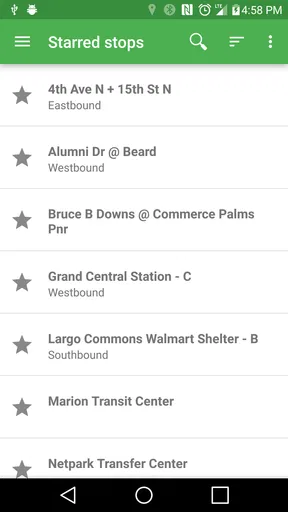
Once I have opened the relevant area, the quality of the result depends on choosing the correct stop. Large streets often have separate stops for opposite directions, nearby branches, or different services that look similar at a glance. I take a moment to check the direction and route before trusting the arrival information. That small pause prevents a common mistake: seeing a bus arriving soon and then discovering it is traveling away from the destination.
Worth Reading Before You Choose

EA SPORTS FC Mobile 26 Is a Bigger Football Game, but It Takes Time

Flipboard Shows What News Apps Must Do Beyond the Feed

Switching to Android Auto Means Rethinking Your Driving Routine

Google Calendar Makes a Crowded Week Easier to Manage

Ludo King Makes the Most of the Minutes Between Plans

Baby Panda World Brings Quick Play to Modern Phones, but Its Game Library Feels Busy
This is one of the app’s less obvious strengths as a daily tool. A live arrival time is not useful by itself; it becomes useful when it is attached to the right stop, direction, and service. I prefer using the app as a confirmation layer after identifying the physical stop, especially in unfamiliar neighborhoods where two stops may be close together but serve completely different journeys.
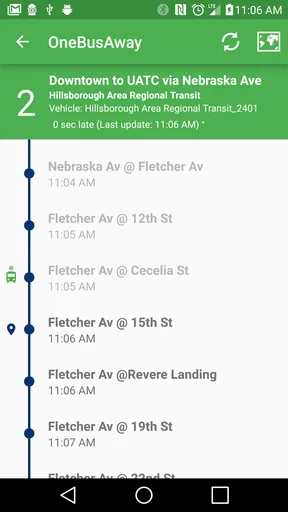
If I am planning from home, I can use the app earlier to inspect a route and understand the likely service pattern. If I am already outside, I use it more narrowly: identify the stop, check the next arrivals, and decide whether waiting is sensible. That two-stage workflow keeps the app from becoming a source of unnecessary browsing.
Reading the live information instead of treating it like a promise
The central handoff is between the transit feed and my own judgment. OneBusAway can show real-time transit information, but I still need to interpret what that means on the ground. An arrival estimate is guidance, not a guarantee that the vehicle will stop exactly when expected or that traffic will not change the situation moments later.
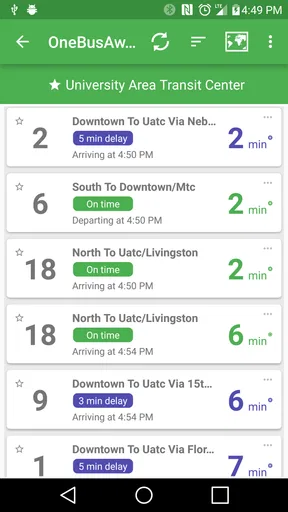
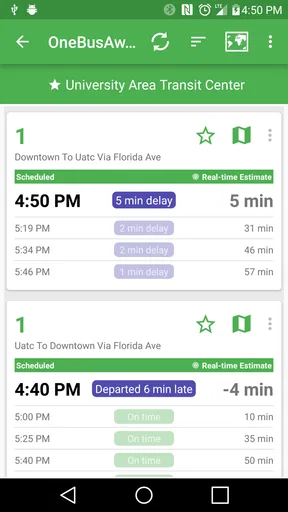
I find the information most useful when comparing several upcoming options. If the next bus is close but the following one is not far behind, waiting may be reasonable. If there is a long gap, walking to another stop or considering a different route becomes more attractive. The app helps expose that choice, while I supply the context: weather, luggage, accessibility needs, and how important it is to arrive on time.
A useful habit is to refresh my understanding after moving. If I walk several blocks to another stop, I do not carry over the old assumption from the first location. I check the new stop and direction again. This sounds obvious, but it is exactly where hurried transit decisions go wrong. The app works best when I treat each stop as a new starting point rather than assuming that a route number alone tells the whole story.
Handing the trip over to the rest of my phone
OneBusAway is not the only tool involved in a complete journey. I may use a general map for walking directions, a transit agency’s own app for service notices, and the vehicle’s destination sign for final confirmation. In that workflow, OneBusAway acts as the live timing specialist. It does not need to handle every part of the trip to be useful.
This separation is particularly helpful for people who already have a preferred mapping app. A general-purpose map may be better for comparing walking routes, driving, cycling, or a broad door-to-door itinerary. OneBusAway makes more sense when the question is specifically about a bus or transit stop and whether the service is moving as expected.
At a busy interchange, I would also verify the platform or boarding area with the physical signs. Digital information and street-level reality can drift apart because stops may be temporarily moved or vehicles may use an unexpected bay. The app can narrow the uncertainty, but it should not replace looking up from the screen.
A realistic evening commute
Imagine I finish work later than planned and walk toward my usual stop. The printed schedule says the next bus should be due soon, but I have already learned not to assume that a scheduled time reflects traffic. I open OneBusAway, locate the stop, check the direction, and compare the next few arrivals.
If the closest bus is genuinely approaching, I stay on the current path instead of rushing to a different stop. If the gap is large, I can inspect another nearby option and decide whether the extra walk is worthwhile. When the bus arrives, I confirm its route and destination before boarding. After that, the app’s main job is finished; the physical sign and my own awareness take over.
The outcome is not that the app magically eliminates delays. The outcome is better timing and fewer blind guesses. I may still arrive late, but I have a clearer reason for the decision I made. That is a modest benefit, yet it is exactly the kind of benefit that becomes valuable when repeated across a week of commuting.
Where the workflow breaks
The biggest weakness is the dependency on local transit coverage and data quality. If the relevant agency is not represented properly, a polished interface cannot solve the problem. Even in a supported area, real-time information may be incomplete or less useful during unusual disruptions. I would not make OneBusAway my only source before an airport departure, an interview, or a medical appointment without checking the operator’s own announcements as well.
There is also a learning curve for occasional riders. A person who only wants a simple door-to-door route may find a focused stop-and-route workflow less immediate than a mainstream maps app. OneBusAway rewards users who understand their local transit network, while a general map often does more of the interpretation automatically.
Another point of friction is the gap between digital precision and street reality. A countdown can encourage me to hurry, but it cannot tell me whether the stop is temporarily relocated, whether boarding is happening at a different curb, or whether a crowded vehicle will have room. I use the live information to decide how urgently to move, not as permission to ignore the surroundings.
For riders with accessibility concerns, the app can be useful for reducing uncertainty around waiting, but I would still verify the physical accessibility of a stop and vehicle through local transit information. The practical question is not only whether a bus is approaching, but whether I can safely reach and board it. That is an important distinction when planning a trip for myself or helping someone else.
Who benefits most from this focused approach
I would recommend OneBusAway to regular bus riders, students, commuters, and anyone who already knows the basic shape of a local transit network. It is especially helpful for people who dislike standing at a stop with no idea whether the schedule is still realistic. The open-source background may also appeal to users who prefer a community-oriented transit project over a purely commercial navigation experience.
It is less suitable as a single travel companion for visitors who need extensive sightseeing planning, walking guidance, fare information, or a fully assembled itinerary. In that situation, a broad mapping service or the local agency’s official app may be the better first choice. I would also skip relying on it alone when service coverage is uncertain or when the trip has no tolerance for disruption.
The app’s free price removes an obvious barrier to trying it, and the Everyone rating makes it approachable for families and mixed-age households. Still, “free” does not remove the need to spend a few minutes learning how local stops are organized. That small investment pays off mainly if I use public transit often enough to repeat the workflow.
Small habits that make the app more dependable
Before an important trip, test OneBusAway with a stop I know well. This quickly reveals whether the local service appears correctly and whether the arrival information matches what I see outside.
Check the direction and destination, not just the route number. Nearby stops can serve opposite directions, and a familiar route number can still be the wrong vehicle for my journey.
Use the app to compare waiting with walking, rather than automatically chasing the shortest countdown. A bus arriving soon at the wrong stop is worse than a slightly later option that is easy to reach.
Keep a second source available for major disruptions. OneBusAway is strongest for live stop awareness, while an agency’s own notices may be better for closures, diversions, or unusual operating changes.
How it compares with familiar alternatives
Compared with a standard timetable, OneBusAway gives me a more practical view of the current wait. A timetable is still useful for learning the normal pattern and planning ahead, but it cannot reflect every delay. Compared with a general maps app, OneBusAway feels narrower and more transit-centered. That narrower scope is an advantage when I want stop-level awareness, but a disadvantage when I need a complete trip across several transport modes.
Compared with an official transit-agency app, the choice depends on what I value. An official app may be the stronger source for agency-specific notices, policies, and service changes. OneBusAway is attractive when I want a focused real-time transit tool and appreciate its open-source identity. I would not insist that one replace the other; using them together can be more sensible than expecting either app to cover every need.
The rating of 4.2 and the sizable user base indicate that many people find the approach worthwhile, but those figures should not be read as a guarantee for every city. Transit apps are unusually local. The same workflow that feels dependable in one service area may feel thin in another, so coverage should be my first practical test rather than the last detail I consider.
My final view after using the complete workflow
OneBusAway succeeds because it concentrates on a real moment of transit anxiety: waiting and not knowing whether the schedule still reflects reality. I like using it as a live decision tool between the stop, the transit feed, and my own judgment. It helps me choose whether to wait, walk, or verify another option, without pretending that a screen can control traffic or replace street-level awareness.
The best reason to install it is simple: it can turn an uncertain wait into an informed choice. The important qualification is equally simple: I would first confirm that my local service is represented and keep another source for major disruptions. For regular riders in a supported area, this free Maps & Navigation app is a practical addition to a daily commute. For occasional travelers seeking an all-in-one itinerary planner, a broader alternative may be more comfortable.
Overall, I see it as a specialist rather than a universal navigator. That is not a weakness when the problem is specifically live bus information. Used with the right expectations, OneBusAway gives public-transit riders a clearer handoff from schedule to street, and that can make ordinary journeys noticeably less stressful.
Pros
- Provides real-time arrival predictions for supported transit agencies.
- Helps compare nearby bus and train options using stop-based searches.
- Open-source project with transparent development and community contributions.
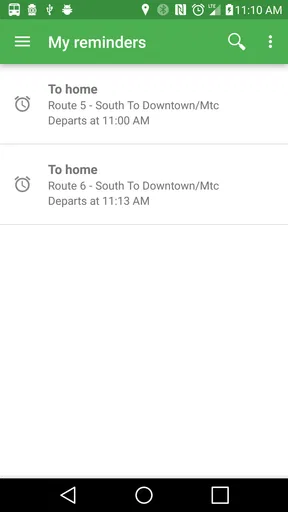
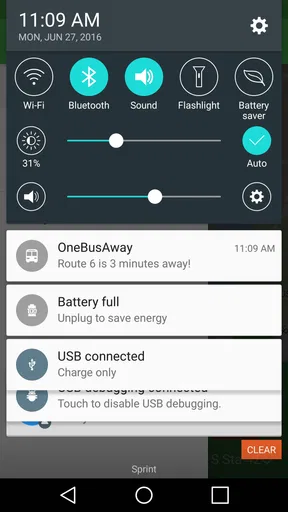
- Can send alerts for service changes and upcoming vehicle arrivals.
- Supports multiple cities and transit systems in one application.
Cons
- Coverage is limited to participating transit agencies and supported regions.
- Prediction accuracy depends on the transit agency’s live data quality.
- The interface can feel dated compared with newer transit apps.
- Some stops may show incomplete routes
- schedules
- or accessibility details.
- Requires location access for convenient nearby-stop discovery.
FAQs for OneBusAway
What is OneBusAway and what does it do?
OneBusAway is a public transportation app designed to help riders track buses and, in some supported areas, trains in real time. After selecting a nearby stop or searching for a route, you can view predicted arrival times, scheduled departures, service information, and stop details. Its usefulness depends heavily on whether your local transit agency provides data to the OneBusAway network.
Does OneBusAway work in every city or transit system?
No. OneBusAway is only available in regions connected to its supported transit agencies and data feeds. Before downloading it, check whether your city or transportation provider appears in the app’s service-area list. Coverage can also vary within a region, and some routes or stops may offer schedules without live predictions. Availability and accuracy depend on the local agency.
Are OneBusAway arrival times accurate and updated in real time?
OneBusAway displays information supplied by participating transit agencies, including scheduled times and real-time vehicle predictions when available. Predictions are generally helpful, but they are not guarantees because traffic, detours, GPS issues, canceled trips, and delayed data updates can affect results. It is wise to allow a small amount of extra time, especially for important journeys.
Does OneBusAway require location access or an internet connection?
The app works best with an internet connection because it needs to retrieve current arrival predictions, service alerts, and transit data. Location access is useful for finding nearby stops, although you can often search manually by route, stop name, or stop number. If you lose connectivity, previously loaded information may not remain current, so offline use is limited.
Is OneBusAway free, and are there any privacy concerns?
OneBusAway is generally available as a free download, with no standard subscription required for its core transit features. The app may request permissions such as location access to identify nearby stops, and its privacy practices can depend on the version and platform you use. Review the permissions and privacy policy before installation, and disable location access if you prefer manual searches.


